Evaluation: measure and compare what matters
Optimize for the wrong metric and a model that looks great on paper fails in production. The goal is not to know every metric — it is to pick the right few for each phase of the workflow, read the numbers correctly, and compare models with statistical rigor.
On this page
- Key concepts
- The confusion matrix
- Workflow: classification
- Workflow: regression
- Workflow: ranking
- Reading the numbers
- Diagnostic curves
- Comparing results
- The business evaluation
- Custom metrics
Key concepts
- Confusion matrix: A 2×2 table that counts true positives (TP), true negatives (TN), false positives (FP), and false negatives (FN). Every classification metric is a function of these four numbers.
- Threshold: The probability cutoff that turns a model’s continuous output into a binary decision. Moving the threshold trades precision for recall.
- Threshold-independent metric: Evaluates the model across all thresholds (e.g., AUC). Use for model comparison — it separates “is this a good model?” from “where do I set the cutoff?”
- Threshold-dependent metric: Evaluates the model at one specific cutoff (e.g., precision at 0.5). Use for final evaluation — it answers “how will this perform at the operating point I deploy?”
- Precision: Of everything the model flagged as positive, how many actually were. High precision = few false alarms.
- Recall (Sensitivity): Of all actual positives, how many the model caught. High recall = few missed cases.
- Specificity (True Negative Rate): Of all actual negatives, how many the model correctly ignored. Often paired with sensitivity in medical and manufacturing domains. High specificity = few false alarms in the negative class.
- Log loss (cross-entropy): Measures how well predicted probabilities match actual outcomes. Unlike AUC or MCC, it penalizes poorly calibrated probabilities — a confident wrong prediction is punished heavily. For a direct check of calibration (whether a predicted 70% is actually right 70% of the time), use calibration curves.
The confusion matrix
Read every classification metric from this table:
                  Predicted positive    Predicted negative
Actual positive        TP                     FN
Actual negative        FP                     TN
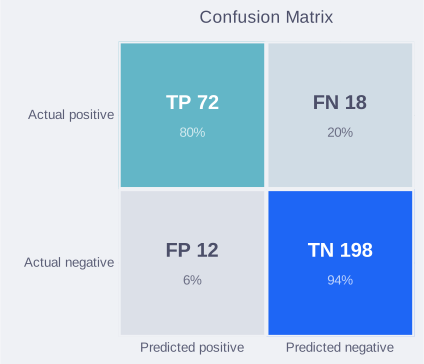
- TP (true positive): correctly caught.
- FN (false negative): missed — the model said “no” but it was “yes.” Cost depends on domain (missed fraud, missed diagnosis).
- FP (false positive): false alarm — the model said “yes” but it was “no.” Cost depends on domain (unnecessary investigation, wasted resources).
- TN (true negative): correctly ignored.
Every metric below is just a different way of combining these four numbers to answer a specific question.
Workflow: classification
Baseline
Before training any model, compute the baseline: what score does a naive predictor achieve?
- Trivial baseline: always predicts the dominant class (e.g.,
DummyClassifier(strategy="most_frequent")). This is your accuracy baseline. If your model barely beats it, the model is not useful. - Random classifier: AUC-ROC = 0.5, MCC = 0. Any trained model should clear these comfortably.
- Simple baseline: a tuned linear model (e.g.,
LogisticRegressionfor classification,Ridgefor regression). Often competitive with complex models — if a complex model barely beats this, the added complexity is not justified.
Establish the baseline first. It prevents you from celebrating a “92% accuracy” on a dataset that is 91% one class — this is the accuracy paradox. A model that predicts the majority class for every input achieves high accuracy on imbalanced data while being completely useless. This is why accuracy alone is insufficient for imbalanced problems. Always pair it with metrics that reflect performance on the minority class: recall, precision, F1, MCC, or AUC-PR.
For a complete baseline workflow including code examples and tracking with MLflow, see Experiments: baselines.
Model selection
You are comparing models or hyperparameter sets. Use threshold-independent metrics so the comparison is fair — you are judging the model’s ranking ability, not a particular cutoff.
To compare reliably, evaluate with cross-validation — typically 5-fold. Sklearn uses stratified k-fold by default for classifiers, preserving class proportions in each fold. A single train/test split can be noisy; cross-validation gives you a mean and standard deviation for each metric. For robust model comparison, run multiple seeds — a single seed can give misleading results (see Experiments: seeds and reproducibility for the full protocol).
Beware of naive splitting. If multiple rows belong to the same entity (e.g., five scans of the same patient), standard cross-validation will put the patient in both the train and test sets, leaking data. Use GroupKFold to ensure all records for an entity stay together. For time-series data, random splitting leaks the future to predict the past; use TimeSeriesSplit or an out-of-time test set.
Balanced data → AUC-ROC.
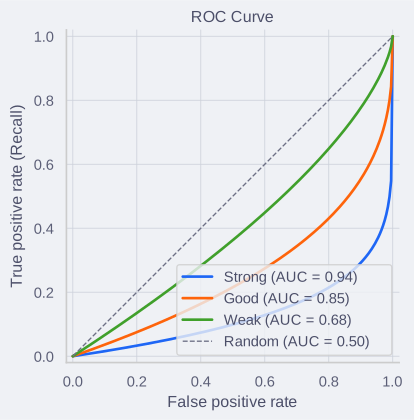
AUC-ROC measures ranking quality: if you pick a random positive and a random negative, AUC is the probability that the model scores the positive higher. AUC = 1.0 is perfect separation, 0.5 is random — the model cannot tell the two apart. Technically, it plots recall (true positive rate) vs false positive rate across all thresholds. AUC says nothing about whether predicted probabilities are calibrated.
How to interpret:
- 0.9–1.0: outstanding discriminator.
- 0.8–0.9: strong — usually production-ready.
- 0.7–0.8: acceptable — may be enough depending on the problem.
- 0.5–0.7: poor — revisit features or model choice.
Imbalanced data → AUC-PR.
AUC-ROC can look misleadingly good on imbalanced data. The reason is FPR dilution: FPR = FP / (FP + TN), and when negatives dominate, TN is huge — so even many false positives barely move the FPR. The ROC curve hugs the upper-left corner and AUC inflates. AUC-PR focuses on the positive (minority) class only, so it gives a more honest picture when positives are rare.
How to interpret: AUC-PR has no universal “good” threshold — the baseline depends on class prevalence. A random classifier scores AUC-PR ≈ the positive class rate (e.g., 0.01 if 1% positive). Any trained model should far exceed that. Compare AUC-PR between models, not against a fixed number.
Use AUC-PR for fraud detection, disease screening, defect detection — any problem where the positive class is under ~10-20% of the data.
When in doubt → MCC.
MCC (Matthews Correlation Coefficient) uses all four quadrants of the confusion matrix. It ranges from −1 (perfect inversion) through 0 (random) to +1 (perfect). Unlike accuracy and F1, MCC can only score high if the model handles both positives and negatives well — F1 ignores TN entirely, so a model that over-predicts the positive class can still get a decent F1. MCC catches that. It works regardless of class balance.
MCC = (TP × TN − FP × FN) / √((TP + FP)(TP + FN)(TN + FP)(TN + FN))
How to interpret:
- 0.7–1.0: strong.
- 0.4–0.7: moderate — may be enough depending on the problem.
- 0.2–0.4: weak — the model has some signal but not much.
- 0.0–0.2: negligible — effectively noise.
- Slightly negative (e.g., −0.05): likely sampling noise, not meaningful — treat as random-level performance.
- Strongly negative (e.g., −0.5): systematic inversion — the model’s predictions are anti-correlated with reality. Check for label bugs or data leakage. If deliberate, flip the predictions.
When probabilities matter → log loss.
AUC and MCC evaluate whether the model ranks or classifies correctly — neither tells you if the predicted probabilities are well-matched to reality. Log loss (cross-entropy) penalizes confident wrong predictions heavily. Note: log loss is a proper scoring rule that reflects both calibration and discrimination together — it cannot isolate one from the other. For a direct assessment of calibration, use calibration curves (reliability diagrams).
Log loss = −mean(y × log(p) + (1 − y) × log(1 − p))
How to interpret: log loss = 0 is perfect. The baseline is the log loss of always predicting the class prevalence (e.g., always predicting 0.01 for a 1% positive rate). Lower is better. There are no universal “good” bands — compare against the baseline and between models. A sudden rise in log loss often means the model is becoming overconfident on wrong predictions.
Use log loss when downstream decisions depend on the probability itself, not just the class label — risk scoring, bid optimization, or any system that uses predicted probabilities as inputs. A model can have a high AUC but poorly calibrated probabilities; log loss catches this.
Multiclass.
All metrics above extend to multiclass problems. The key decision is how to average across classes — and it changes the story. Imagine three classes with 1000, 100, and 10 samples:
macro: compute the metric per class, then take the unweighted mean. The 10-sample class counts as much as the 1000-sample class. Use this when rare classes are important — it surfaces poor performance on them.weighted: same as macro, but weighted by the number of true instances per class. The 1000-sample class dominates. Use this when the score should reflect overall performance proportional to class frequency.micro: pool all TP, FP, FN globally, then compute. For multiclass (not multilabel), micro F1 = micro precision = micro recall = accuracy.
MCC works for multiclass without averaging — pass predictions directly to sklearn.metrics.matthews_corrcoef. Note: for multiclass, the minimum MCC is between −1 and 0 (depending on class distribution), not exactly −1.
AUC-ROC extends via one-vs-rest (ovr) or one-vs-one (ovo) and requires probability scores. For imbalanced multiclass, prefer ovo with average='macro' — it is less sensitive to class imbalance.
Threshold tuning and evaluation
You picked a model. Now you choose the operating point — the threshold where the model makes actual decisions.
This is where you align the metric with the business cost of errors.
False negatives are expensive → optimize recall.
Recall = TP / (TP + FN). Lowering the threshold catches more positives but increases false alarms.
Use when: a miss is dangerous or costly (medical screening, security threats). Accept more false positives to catch more true positives.
False positives are expensive → optimize precision.
Precision = TP / (TP + FP). Raising the threshold reduces false alarms but misses more positives.
Use when: each positive prediction triggers an expensive action (manual review, production rollback, customer intervention).
Both matter roughly equally → use F1.
F1 = 2 × (precision × recall) / (precision + recall). The harmonic mean penalizes extreme imbalances — a model with 99% precision and 1% recall gets a low F1.
F1 assumes false positives and false negatives cost the same. If they do not, use F-beta with a beta > 1 (favor recall) or beta < 1 (favor precision).
When the negative class is important → use Specificity.
Specificity = TN / (TN + FP). Use this alongside recall (sensitivity) when the negative class represents something critical, such as healthy patients in a medical test. High specificity means few false alarms.
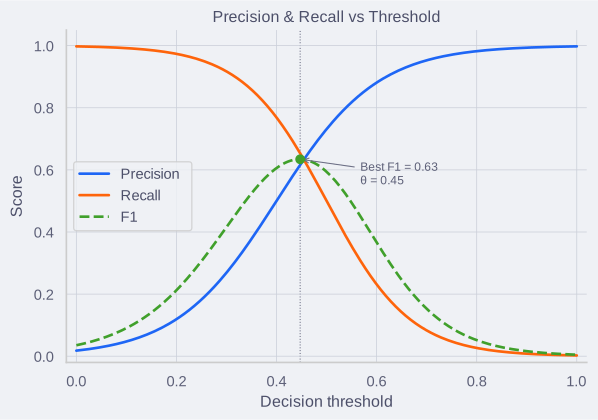
How to pick the threshold in practice:
- Plot precision and recall as a function of threshold.
- Identify the region where both are acceptable for your use case.
- Pick the threshold that matches your cost trade-off.
- Report precision, recall, and F1 at that threshold — not just the “best F1.”
Production monitoring
Models degrade. Data distributions shift, upstream features change, and user behavior evolves.
Performance metrics (F1, precision, recall) require ground truth labels. In many production settings, labels are delayed or unavailable — this is one of the hardest problems in production ML. When labels are delayed, rely on feature drift and prediction drift as proxy signals until labels arrive.
- Track the same metric you optimized at threshold tuning, computed on live predictions once labels are available.
- Set alerts for significant drops. A simple starting point is a fixed threshold (e.g., F1 drops more than 5% from a rolling average). More robust approaches use statistical tests (e.g., PSI, KS test) that account for sample size and natural variance.
- Watch for training-serving skew: features computed differently at training time and serving time. This is a common and hard-to-detect failure mode.
- Monitor feature and prediction distributions against a reference baseline (typically the training data distribution). This does not require labels and can catch degradation before performance metrics show it.
Workflow: regression
Baseline
- Mean predictor: always predicts the mean of the target. Your model should beat this comfortably.
- For time series: the naive baseline is “predict the last observed value.”
Model selection and evaluation
Unlike classification, regression does not have a threshold step. The same metrics serve both model selection and evaluation. As with classification, use cross-validation (typically 5-fold) to get reliable estimates — sklearn uses standard k-fold by default for regressors.
Default → MAE.
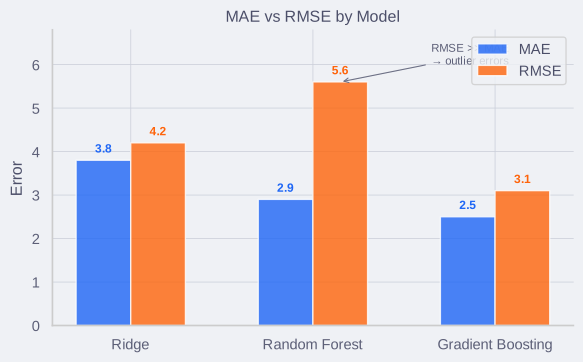
The average size of the error, in the same unit as the target. Easy to interpret: “the model is off by 2.3 units on average.” MAE treats all errors equally — it is robust to outliers and is the right default unless you have a specific reason to penalize large errors more.
MAE = mean(|y − ŷ|)
When big misses are costly → RMSE.
RMSE punishes large errors disproportionately — the squaring step makes sure a few big misses raise RMSE much more than they raise MAE. Use RMSE when a large error is much worse than a small one: demand forecasting (big underestimate = stockout), energy grid planning, structural engineering.
RMSE = √(mean((y − ŷ)²))
When business needs a percentage → MAPE.
Mean Absolute Percentage Error translates errors into percentages, making it much easier to explain to non-technical stakeholders (“the forecast is off by 5% on average”). However, MAPE is fundamentally flawed if the actual values can be zero (where it divides by zero and explodes) or close to zero. It also penalizes overestimates more heavily than underestimates. Use it for reporting, but be cautious about optimizing for it directly.
MAPE = mean(|(y − ŷ) / y|)
For targets with heavy right tails → RMSLE.
Root Mean Squared Logarithmic Error is used when the target spans several orders of magnitude (prices, income, counts). An error of $100 matters a lot if the true price is $50, but is irrelevant if the true price is $500,000. RMSLE penalizes relative differences rather than absolute ones, and it penalizes underestimates more heavily than overestimates.
RMSLE = √(mean((log(y + 1) − log(ŷ + 1))²))
For scale-independent comparison → R².
R² answers one question: what proportion of the variance in the target does the model explain? R² = 1.0 is perfect, R² = 0 means the model is no better than predicting the mean.
R² = 1 − (SS_res / SS_tot), where SS_res = Σ(y − ŷ)² and SS_tot = Σ(y − ȳ)².
Use R² when comparing models across different targets or scales (MAE and RMSE are in the target’s units, so they are not directly comparable across different problems). R² is also sklearn’s default .score() for regressors.
How to interpret:
- R² = 1.0: perfect — the model explains all variance.
- 0.7–1.0: strong — the model captures most of the signal.
- 0.4–0.7: moderate — useful but missing substantial variance. Check for missing features or nonlinearity.
- 0.0–0.4: weak — the model explains little. Consider whether the problem is inherently noisy or the features are insufficient.
- R² < 0: the model is worse than always predicting the mean. Something is fundamentally wrong.
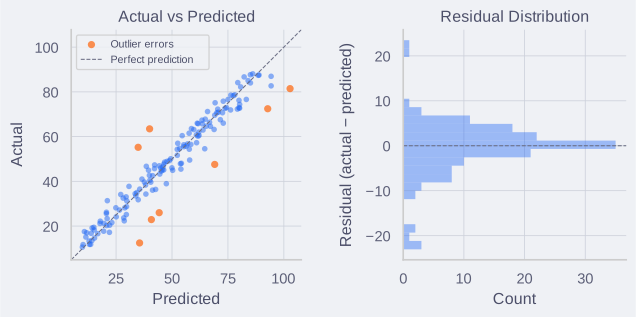
Interpreting MAE and RMSE together. RMSE is always ≥ MAE. The gap between them tells you something: if RMSE ≈ MAE, errors are uniform — the model misses by roughly the same amount everywhere. If RMSE » MAE, a few large errors are pulling RMSE up — investigate the outliers, as they may reveal a data quality issue, a subpopulation the model cannot handle, or a feature gap. Report both: MAE tells you the typical error, RMSE tells you about the worst-case behavior.
Production monitoring
As with classification, performance metrics require ground truth labels. When labels are delayed, monitor feature drift and prediction drift as proxy signals.
- Track MAE (or RMSE, depending on what you optimized) on live predictions once labels are available.
- Watch for error drift: if MAE rises steadily, investigate — possible causes include concept drift (the relationship between features and target is shifting), data quality issues, population shift, or upstream pipeline changes.
- Monitor error percentiles (P90, P99) over time. Rising tail percentiles reveal growing outlier errors that MAE alone can mask — a subpopulation may be diverging from training data.
- Compare live R² against the training R². A large drop signals that the model’s explanatory power has degraded.
- Check for feature drift: if the distribution of key input features shifts significantly from training, the model’s predictions may degrade before the target metric shows it.
Workflow: ranking
When you are not just predicting a number, but ordering items (search results, product recommendations, feeds), classification and regression metrics fail. A model might predict scores with high RMSE, but if it still sorts the most relevant items to the top, it is a perfect ranker.
Baseline
- Popularity-based baseline: Always recommend the globally most popular items. In many domains, this is surprisingly hard to beat.
- Random baseline: Shuffle the items randomly.
Model selection and evaluation
Ranking metrics evaluate position. Being wrong at position 1 is heavily penalized; being wrong at position 100 barely matters.
When there is only one right answer → MRR.
Mean Reciprocal Rank is used when the user is looking for a single specific item (e.g., a “feeling lucky” search, finding a specific song, or answering a factual question). It is the average of 1 / rank for the first relevant item.
MRR = mean(1 / rank_i)
How to interpret: MRR = 1.0 means the relevant item is always first. MRR = 0.5 means it is usually second.
When there are multiple right answers (binary relevance) → MAP.
Mean Average Precision is used when there are multiple relevant items, but relevance is binary (yes/no). It rewards putting all relevant items as high as possible. It computes the Average Precision for each query (the area under the precision-recall curve for that specific ranking), and then takes the mean across all queries.
When relevance has degrees (graded relevance) → NDCG.
Normalized Discounted Cumulative Gain is the gold standard for modern search and recommendation. Unlike MAP, which assumes an item is either relevant or not, NDCG handles graded relevance (e.g., 5-star ratings, “highly relevant” vs “somewhat relevant”).
It sums the relevance scores of the ranked items, discounting them logarithmically by their position (1 / log2(rank + 1)), and then normalizes against the ideal possible ranking for that query so the score is between 0 and 1.
How to interpret:
- Evaluated at a cutoff K (e.g., NDCG@10), because users rarely look past the first page of results.
- NDCG = 1.0 is a perfect ranking.
- Useful for comparing algorithms, but harder to explain to business stakeholders than simple conversion metrics.
from sklearn.metrics import ndcg_score

# Graded relevance (e.g., 5-star ratings or human labels)
y_true = [[5, 3, 1, 0, 2]]
# Model's predicted ranking scores
y_score = [[0.9, 0.7, 0.5, 0.3, 0.1]]

ndcg_10 = ndcg_score(y_true, y_score, k=10)
For simpler evaluation and monitoring → Precision@K and Recall@K.
These are complementary to the ranking-aware metrics above. They are easier to explain to non-technical stakeholders and widely used in production monitoring alongside NDCG.
Precision@K = (# relevant items in top K) / K
Recall@K = (# relevant items in top K) / (total # relevant items)
Precision@K tells you what fraction of your recommendations are good. Recall@K tells you what fraction of all good items you surfaced. If you recommend 10 items and 7 are relevant, Precision@10 = 0.7. If there were 20 total relevant items in the catalog, Recall@10 = 7/20 = 0.35.
Unlike NDCG and MAP, these metrics ignore the order within the top K — they only care whether relevant items made it into the list, not where they appear. Use Precision@K when the user’s attention is limited (e.g., showing only 5 products) and you want to ensure the shortlist is high-quality. Use Recall@K when coverage matters — in multi-label classification or when you need to ensure all relevant items get surfaced.
Hit Rate@K is the binary version: did at least one relevant item appear in the top K? Useful for “single-intent” queries where the user needs any one correct answer.
Beyond accuracy: diversity and coverage
Pure accuracy optimization creates filter bubbles — users see only variations of what they already like, the catalog concentrates on a few popular items, and discovery breaks down. Enterprise recommendation systems must balance relevance with diversity and coverage.
Coverage: what proportion of the catalog gets recommended over time.
Coverage = (# unique items recommended) / (# items in catalog)
If your catalog has 10,000 products but 90% of recommendations come from the same 100 popular items, coverage = 0.01 — you have a popularity bias problem. High coverage ensures the long tail gets exposure. For marketplaces (Etsy, Airbnb), this is a business requirement — sellers expect visibility.
Track coverage over rolling windows (e.g., daily, weekly). A coverage drop often signals that the model is converging on a narrow set of items. This is especially common after retraining on click data — clicks reinforce popular items, creating a feedback loop.
Diversity: how different the recommended items are from each other within a single list.
Intra-List Diversity (ILD) measures the average pairwise dissimilarity between items in a recommendation:
ILD = (1 / (K × (K − 1))) × Σ dissimilarity(item_i, item_j) for all pairs in the top K.
Dissimilarity can be cosine distance between item embeddings, category mismatch, or any domain-specific measure. High diversity prevents the “10 nearly identical recommendations” problem.
Personalization: how different recommendations are across users.
If every user gets the same top-10 list, personalization is zero — the system is just a popularity ranker. Measure this as the average Jaccard distance between recommendation lists for different users.
Trade-offs. Optimizing purely for NDCG often reduces diversity — the model learns to recommend safe, popular items. Use a composite objective (e.g., 0.7 × NDCG + 0.3 × diversity) or apply post-processing re-ranking to boost diversity while maintaining a minimum relevance threshold. Many production systems use a two-stage approach: retrieve candidates for relevance, then re-rank for diversity.
Production monitoring
Ground truth relevance is rarely available immediately, so track user behavior and catalog health.
Engagement:
- Click-Through Rate (CTR): Percentage of queries with clicks. Dropping CTR signals degrading relevance.
- Click position: Average rank of clicked items. Rising position means users must scroll further. Correct for position bias (users click top results regardless of relevance).
- Dwell time: Time spent after clicking. High CTR + low dwell time = misleading rankings.
- Session success rate: Percentage of sessions where users find what they need (purchase, long watch, no re-query). Better satisfaction proxy than CTR alone.
- Zero-result rate: Queries with no clicks. Spikes indicate retrieval failure or intent mismatch.
- Conversion rate: Whether clicks lead to business outcomes (purchases, sign-ups, watch time).
Catalog health:
- Coverage: Percentage of catalog recommended over rolling windows. Drops signal convergence on popular items.
- Popularity bias: If 80% of traffic → 5% of items, you have a long-tail problem. Critical for marketplaces.
- Freshness: Age distribution of recommendations. Prevents new content/creators from being buried.
Rapid evaluation:
Offline metrics (NDCG) do not always correlate with business metrics (revenue). A/B tests are expensive (weeks, large traffic). Use interleaving first.
Interleaving mixes two models in one session (items 1,3,5 from model A; 2,4,6 from model B) and tracks which gets more clicks. 100× more sensitive than A/B testing — detect differences with small traffic in hours vs weeks. Used by Airbnb, Google, Bing to identify candidates before full A/B tests.
Once interleaving shows a winner, validate with A/B test for business impact.
Fairness:
- Track metrics by user segment (geography, demographic, device). Overall NDCG can hide subgroup failures.
- Monitor exposure distribution for marketplaces — ensure diverse sellers get visibility.
- Watch for feedback loops: clicks reinforce popularity bias. Inject periodic exploration.
Reading the numbers
Metrics are only useful if you interpret them in context.
- Compare train and validation metrics. If the training score is high and the validation score is low, the model is overfitting — add regularization, reduce features, or get more data. If both are low, it is underfitting. A small gap with high scores on both is a good fit.
- Always compare to the baseline. An F1 of 0.85 means nothing in isolation. If the majority-class baseline gives 0.80, the model adds almost no value.
- Check both classes. A high overall score can hide poor performance on the minority class. Always look at per-class precision and recall.
- Check the slices (subgroup analysis). A model might have a fantastic overall MAE or AUC, but perform terribly for a specific geography, demographic, or customer segment. Global metrics hide local failures. Always evaluate the worst-performing slice before deploying, especially for models that impact humans.
- Compare MAE and RMSE. If RMSE is much larger than MAE, you have an outlier problem — do not average it away.
- Negative MCC: check the magnitude. Slightly negative (near zero) is likely noise. Strongly negative means the model is systematically inverted — check for label errors, data leakage, or a flipped target. If the inversion is confirmed, flip the predictions.
- Context determines “good enough.” An AUC of 0.75 can be strong for a hard medical imaging task and terrible for a spam filter. There is no universal threshold for a “good” score.
- Suspiciously perfect scores signal leakage. If a model achieves an AUC of 0.99 on a non-trivial problem, the most likely explanation is data leakage — not a great model. Check for target information bleeding into features, preprocessing applied before the train/test split, or duplicate records across splits. Similarly, tuning hyperparameters on the test set inflates all metrics — always use a separate validation set or cross-validation.
- Read the standard deviation from cross-validation. A mean AUC of 0.83 ± 0.02 is more trustworthy than 0.85 ± 0.08. High variance across folds means the model’s performance depends heavily on which data it sees — the model may be unstable or the dataset too small. If the standard deviation is large relative to the difference between models, you cannot confidently pick a winner.
- Test set class balance must match deployment. Precision, recall, and F1 depend on the ratio of positives to negatives. If your test set has 10% positives but production has 1%, precision will be worse in production than your test results suggest. AUC-ROC is invariant to class balance shifts, but threshold-dependent metrics are not.
- Small test sets lie. A metric computed on 100 samples has wide confidence intervals. If you cannot increase the test set, use bootstrap resampling to quantify uncertainty.
Diagnostic curves
Learning curves
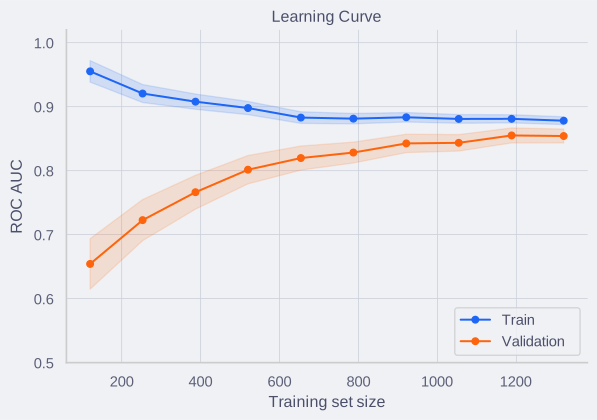
A learning curve plots train and validation scores as the training set grows. It answers two questions: is the model underfitting or overfitting, and would more data help?
from sklearn.model_selection import learning_curve

train_sizes, train_scores, val_scores = learning_curve(
    estimator, X, y,
    train_sizes=np.linspace(0.1, 1.0, 10),
    cv=5,
    scoring="roc_auc",
    n_jobs=-1,
)

train_mean = train_scores.mean(axis=1)
val_mean = val_scores.mean(axis=1)
How to read the plot:
- Both curves converge high, small gap: good fit. More data is unlikely to help — focus on feature engineering or model complexity.
- Both curves converge low: underfitting. The model cannot capture the signal — try a more expressive model, add features, or reduce regularization.
- Large gap (train high, validation low): overfitting. The model memorizes training data — add regularization, reduce features, or get more data.
- Validation curve still rising at the right edge: more training data would likely improve performance. This is one of the few cases where collecting more data is clearly the right move.
Validation curves
While a learning curve shows performance vs. amount of data, a validation curve plots train and validation scores against varying values of a single hyperparameter (e.g., tree depth, regularization strength). It is the primary visual tool for diagnosing whether your model’s complexity is appropriate for the data.
from sklearn.model_selection import validation_curve

param_range = np.logspace(-3, 2, 6)
train_scores, val_scores = validation_curve(
    estimator, X, y,
    param_name="C",
    param_range=param_range,
    cv=5,
    scoring="roc_auc",
    n_jobs=-1,
)
How to read the plot:
- High bias (underfitting): Both training and validation curves are low. The model is too simple to capture the underlying pattern (e.g., a tree with max depth 1, or extreme regularization).
- The sweet spot: The point where the validation score peaks before beginning to decline. This is your optimal hyperparameter value.
- High variance (overfitting): The training score continues to climb (often approaching perfect performance), but the validation score drops or flatlines. The model is too complex and has begun memorizing noise in the training set.
Calibration curves
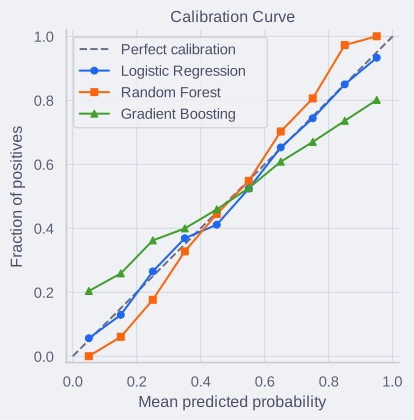
A calibration curve (reliability diagram) checks whether predicted probabilities match observed frequencies. A model that predicts 70% should be correct about 70% of the time.
from sklearn.calibration import calibration_curve

prob_true, prob_pred = calibration_curve(y_test, y_prob, n_bins=10)
How to read the plot:
- Points on the diagonal: well-calibrated — predicted probabilities reflect reality.
- Points above the diagonal: the model is underconfident — it predicts 0.3 but the true rate is higher.
- Points below the diagonal: the model is overconfident — it predicts 0.8 but the true rate is lower.
Common patterns by model type: logistic regression is usually well-calibrated out of the box. Tree ensembles (random forest, gradient boosting) and SVMs often produce poorly calibrated probabilities — random forests tend toward the center (underconfident at extremes), while gradient boosting can be overconfident.
If calibration is poor and your use case depends on probability quality (risk scoring, bid optimization), apply post-hoc calibration:
from sklearn.calibration import CalibratedClassifierCV

calibrated = CalibratedClassifierCV(estimator, cv=5, method="isotonic")
calibrated.fit(X_train, y_train)
Use method="sigmoid" (Platt scaling) when data is limited. Use method="isotonic" when you have enough data (1000+ samples) for a more flexible correction.
Cumulative gains and lift curves
When evaluating a classification model for a targeted campaign — e.g., you can only afford to manually review 1,000 transactions for fraud, or call 10% of your sales leads — you need to know how well the model concentrates true positives at the very top of its ranked predictions.
A Cumulative Gains curve plots the percentage of the total population targeted (X-axis) against the percentage of all actual positive cases found (Y-axis).
import scikitplot as skplt
import matplotlib.pyplot as plt

# y_prob should contain probabilities for both classes
# e.g., y_prob = model.predict_proba(X_test)
skplt.metrics.plot_cumulative_gain(y_test, y_prob)
plt.show()
How to read a Cumulative Gains plot:
- The diagonal (random baseline): If you target a random 20% of users, you will find 20% of the true positives.
- The model curve: If the curve hits 0.70 at the 0.20 mark on the X-axis, it means targeting the top 20% of users (ranked by model probability) captures 70% of all actual positives.
A Lift curve is derived directly from the cumulative gains curve. It shows the multiplier of improvement over random guessing at each decile. If you target the top 10% of users and find 3 times as many positives as a random 10% sample would yield, your lift at the 10th percentile is 3.0.
These curves are indispensable for translating model performance into business strategy: they let stakeholders answer questions like “How deep into the list should we go to hit our ROI target?”
Comparing results
Statistical significance
A model with a higher mean score is not necessarily better — the difference might be noise. Use statistical tests to quantify confidence.
Paired tests compare models on the same data. Each seed (or fold) produces a paired observation: model A’s score and model B’s score on the same split. Paired tests are more powerful than unpaired tests because they control for variance across splits.
How many seeds? Hypothesis tests need enough paired observations to have statistical power. With fewer than 6 paired observations, the Wilcoxon signed-rank test cannot reach p < 0.05 — and a paired t-test with 4 degrees of freedom is barely better. You need at least 10 paired observations for minimal statistical power — this could come from 10 seeds (single train/test split per seed), 10 CV folds (single seed), or a combination. For robust, publishable comparisons, use 10 seeds × 5-fold CV = 50 paired observations (see Experiments: reproducibility and seed protocols). With fewer than 10 paired observations, report bootstrap confidence intervals instead of p-values.
Paired t-test: assumes the paired differences are approximately normally distributed. Use when you have 10+ seeds or folds and the differences look roughly symmetric.
from scipy import stats

# scores_a and scores_b: arrays of metric values, one per seed/fold
t_stat, p_value = stats.ttest_rel(scores_a, scores_b)
Wilcoxon signed-rank test: non-parametric alternative. Makes no normality assumption. Use when the differences are clearly skewed or you cannot assume normality. Requires at least 6 paired observations to reach p < 0.05; in practice, 10+ for reasonable power.
stat, p_value = stats.wilcoxon(scores_a, scores_b)
Bootstrap confidence interval: resample the paired differences with replacement to estimate the distribution of the mean difference. Reports a confidence interval rather than a p-value — often more informative, and the best option when you have few seeds (5–10).
differences = scores_a - scores_b
bootstrap_means = [
    np.mean(np.random.choice(differences, size=len(differences), replace=True))
    for _ in range(10000)
]
ci_lower, ci_upper = np.percentile(bootstrap_means, [2.5, 97.5])
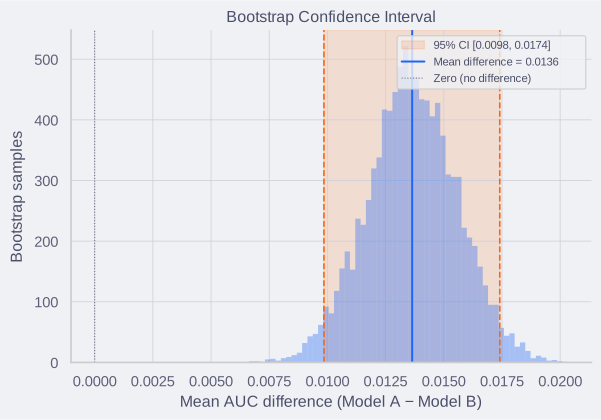
If the 95% confidence interval excludes zero, the difference is significant at α = 0.05.
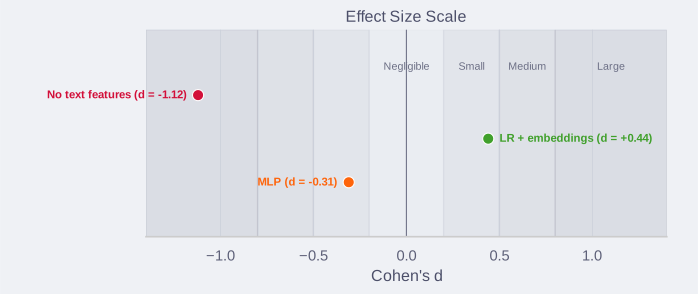
Effect size: statistical significance does not imply practical significance. A p-value of 0.01 with a 0.001 AUC difference means the difference is real but irrelevant. Report Cohen’s d alongside p-values:
d = np.mean(differences) / np.std(differences, ddof=1)
| Interpretation: | d | < 0.2 negligible, 0.2–0.5 small, 0.5–0.8 medium, > 0.8 large. |
Multiple comparisons: when comparing more than two models, the probability of a false positive increases. If you compare 10 models pairwise, you run 45 tests — at α = 0.05, you expect ~2 false positives by chance. Apply the Holm-Bonferroni correction:
from statsmodels.stats.multitest import multipletests

rejected, corrected_p, _, _ = multipletests(p_values, method="holm")
Reading a comparison table
Present results so a reviewer can assess both magnitude and confidence:
Model               AUC (mean ± std)    Δ Control    p-value    Cohen's d
─────────────────────────────────────────────────────────────────────────
Control (XGBoost)   0.847 ± 0.012       —            —          —
MLP                 0.839 ± 0.015       −0.008       0.142      −0.31
LR + embeddings     0.852 ± 0.010       +0.005       0.038      +0.44
No text features    0.821 ± 0.014       −0.026       0.003      −1.12
How to read this table:
- Mean ± std: the average metric across seeds. The std tells you how stable the model is. A model with higher mean but much higher std may not be reliably better.
- Δ Control: the difference from the baseline. Positive means better, negative means worse (assuming the metric is higher-is-better).
- p-value: probability of observing this difference (or larger) by chance, assuming no real difference. Below 0.05 is the conventional threshold, but report the actual value — let the reader judge.
-
Cohen’s d: effect size. Even if p < 0.05, a negligible effect size ( d < 0.2) means the difference is not practically meaningful.
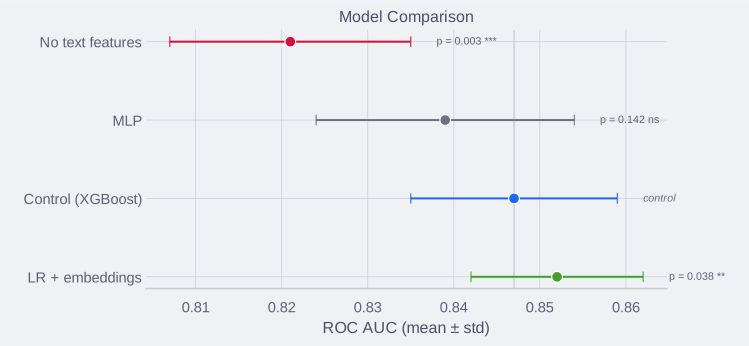
In the example: “No text features” is significantly worse (p = 0.003, large effect), confirming text features are important. “LR + embeddings” is significantly better (p = 0.038, small-to-medium effect) — worth investigating further. “MLP” is not significantly different from the control (p = 0.142).
The business evaluation
The model with the highest AUC or lowest RMSE on the cross-validation leaderboard is rarely the best model to deploy. In production, predictive accuracy is just one variable in a larger business equation. Before deploying, evaluate the model against these operational constraints.
Expected value (EV)
A model is only worth deploying if its Return on Investment (ROI) is positive. To calculate this, translate the confusion matrix into dollars using an expected value framework.
EV = p(TP) × Value(TP) + p(TN) × Value(TN) - p(FP) × Cost(FP) - p(FN) × Cost(FN)
If the expected value of using the model is lower than the expected value of your current baseline (which might be a simple rules engine, or a manual review process), the model is a failure, regardless of its statistical significance.
Hard vs. Soft ROI. Distinguish between hard ROI (revenue increase, cost reduction, fraud prevented) and soft ROI (faster decisions, reduced manual work, better customer experience). Report both: executives care about dollars, teams care about whether the model makes their work easier. Example: a fraud model that saves $50K per year (hard) but also cuts analyst investigation time by 30% (soft) has stronger total value than the $50K alone suggests.
The complexity tax
A massive gradient boosting ensemble might beat a simple logistic regression by 0.02 AUC. However, the complex model carries a “complexity tax”:
- Compute cost: It costs more to train and host.
- Latency: It takes longer to generate predictions, which can degrade user experience (e.g., in real-time bidding or search).
- Maintenance: It is harder to monitor, debug, and update.
Always establish a simple baseline. If a complex model yields only a marginal improvement over a simple one, deploy the simple one. You should only pay the complexity tax if the expected business value of the accuracy bump far exceeds the operational costs.
Interpretability constraints
In highly regulated domains (finance, healthcare, insurance), deploying a “black-box” model is often illegal or ethically unacceptable. If a customer is denied a loan or a medical claim, the business must explain exactly why.
In these environments, an interpretable model (like logistic regression, decision trees, or generalized additive models) with an AUC of 0.82 will always win against a deep neural network with an AUC of 0.87. Evaluate whether your use case requires intrinsic explainability before exploring complex architectures.
Offline vs. online performance
Good offline metrics (AUC, MAE, NDCG) are just a ticket to run an A/B test. The ultimate evaluation is whether the model actually moves the core business KPIs (revenue, retention, conversion rate) in a live environment.
Offline metrics often diverge from online reality due to:
- Feedback loops: The model’s predictions change user behavior in ways historical data cannot capture.
- Latency: The new model is more accurate but slower, causing users to abandon the page.
- Cannibalization: The model increases clicks on one feature but decreases them on a more profitable one.
Never consider an evaluation complete until the model has proven its value in a randomized controlled trial (A/B test) against the production baseline.
Time-to-value
Do not assume day-one performance persists indefinitely. Factor in:
- Ramp-up period: users need time to trust the model. A recommendation system might show weak engagement for weeks until users learn the interface. Budget 1-3 months for adoption.
- Maintenance costs: retraining costs compute and engineer time. Monitoring requires infrastructure. A model with 10% higher accuracy but 3× the maintenance burden may have worse long-term ROI.
- Drift: performance degrades without retraining. If your fraud model requires weekly retraining to stay effective, include that recurring cost.
Project ROI over 12-24 months, not launch day. A simpler model with stable performance often beats a complex one that requires constant tuning.
Custom metrics
Metrics like accuracy and F1 assume all errors cost the same. In practice they rarely do. When the business cost of a false negative is fundamentally different from a false positive, you need cost-sensitive evaluation.
Try the simple options first. Before building a custom metric, check whether sklearn’s built-in mechanisms are enough. class_weight (available in LogisticRegression, SVC, RandomForestClassifier, etc.) lets you set per-class weights that modify the training loss — e.g., class_weight={0: 1, 1: 50} encodes a 50:1 cost ratio directly. sample_weight allows per-sample weighting in both training and evaluation. These handle many cost-sensitive scenarios without writing any custom code.
When to build a custom metric:
- A false negative costs 100× more than a false positive (or vice versa) and F-beta does not capture the ratio well enough.
- The business cares about a quantity that no standard metric measures (e.g., revenue impact per prediction, time-to-detection).
- You need to combine multiple signals into a single optimization target (e.g., revenue-weighted accuracy). Note: for constraints like latency, the standard approach is to treat them as satisficing metrics (must be below a threshold) and optimize accuracy separately, rather than combining them into one formula.
How to build one:
- Write down the cost matrix. Assign a concrete cost (dollars, hours, risk) to each cell of the confusion matrix. If you cannot quantify it, estimate the ratio — “a missed fraud case costs roughly 50× more than a false alert” is enough.
- Define the formula.
Weighted cost = (FN × cost_fn) + (FP × cost_fp). Minimize this. This assumes correct predictions (TP, TN) have zero or equal cost — if a true positive has direct value (e.g., revenue from an approved loan), include those terms too. For regression, replace the uniform loss with a domain-specific penalty (e.g., asymmetric loss that penalizes underestimates more than overestimates). - Make it a scorer. Wrap it so your training framework can optimize against it (e.g.,
sklearn.metrics.make_scorer). If the metric is not differentiable, use it for evaluation and cross-validation — optimize a differentiable proxy during training. - Validate it against intuition. Compute the custom metric on a few examples where you know the right answer. If the metric disagrees with human judgment, the cost model is wrong — fix the costs, not the judgment.
Keep the standard metrics alongside it. A custom metric optimizes for business value, but standard metrics (precision, recall, MCC) remain your sanity check. If the custom metric improves while MCC drops, something is off.